
Every now and then a release comes along that is less about the list of new buttons and more about where a product is heading. Peakboard Hub 2.3 is one of those. On the surface it brings the usual pile of improvements: lists that can validate their cells against another list, a reworked file manager, a variables page that finally behaves like a proper table, background imports that no longer block the UI, and a Hub that keeps running and recovers by itself when the database disappears for a moment. All welcome, none of it revolutionary.
The two changes that matter are of a different kind. One adds a completely new way to run Peakboard applications, and the other quietly rebuilds the foundation the Hub stands on. Let’s look at both.
Peakboard LINK
Until now, a Peakboard application needed hardware to live on: a Peakboard Box next to the screen, or a BYOD instance on a Windows machine. Peakboard LINK removes that requirement. The application runs on the Hub server itself, and anyone with a browser connects to it over a board link. Not as a passive view either; the application is fully interactive, exactly as it would be on a touch screen in front of a box.
Every pbmx file in the Hub file storage can be turned into a LINK instance, and we can create several instances of the same application, each with its own board link and QR code. The overview shows at a glance how many clients are connected to each one, and an optional five digit access code keeps a board from being opened by anyone who happens to have the URL.
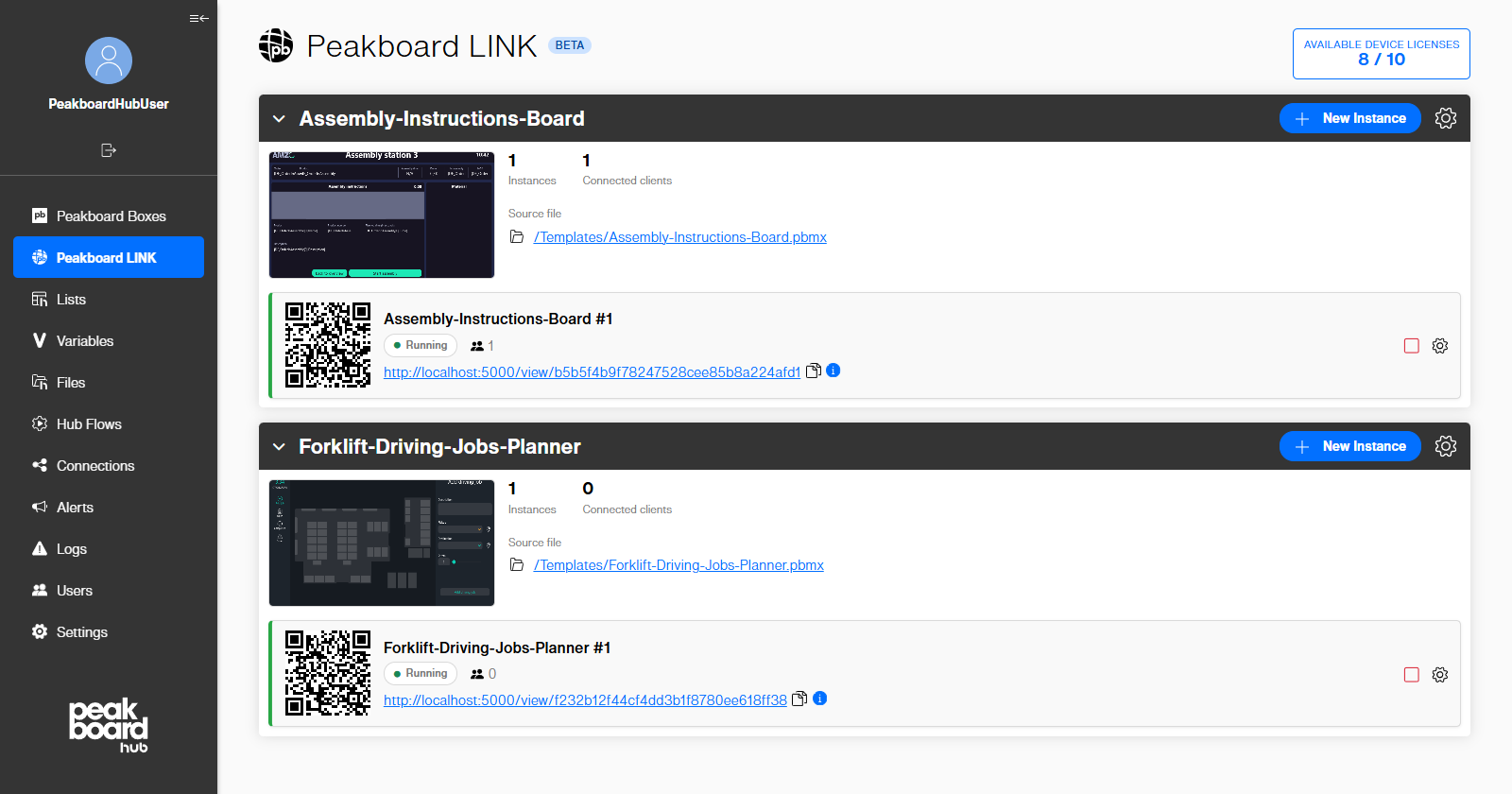
Licensing follows the same idea: LINK device and user licenses are assigned directly in the Hub, and the header tells us how many are still free. And because the Hub knows which file an instance came from, it notices when a newer version of that pbmx is uploaded and offers to update the running board.
We took LINK apart in detail last week in Sneak Peek - Meet Peakboard LINK, from putting the application into the Hub to handing out the link. Worth a read, because the most remarkable part is what is missing: there is no special web flavour of a Peakboard application. The same pbmx runs on a box, on BYOD, or in a browser, without touching a single script or data source.
Goodbye IIS
The second big change is one that nobody sees in the UI, and that anyone who has ever installed the Hub will appreciate. The Peakboard Hub and the Peakboard Hub API no longer run as sites inside IIS. They are now Windows services in their own right, called PeakboardHub and PeakboardHubApi, starting automatically and restarting themselves after a failure. IIS is simply not needed any more.
Anyone who has set up a Hub on a customer server knows why this matters. IIS meant a Windows feature to install, an application pool to configure, bindings to get right, and a certificate store to understand, all before the Hub had done anything useful. It also meant that the Hub shared a web server with whatever else happened to live on that machine, which is a wonderful source of mysterious port conflicts.
The good news is that the migration is not a project. Running the new setup on a server with an IIS installation stops the old site, takes over the bindings we select including the HTTPS certificates, creates and starts the services, opens the firewall ports, and removes the IIS site and its application pool afterwards. The database connection and the rest of the appsettings.json settings come along automatically, and the setup backs up the database before it starts.
Alongside the services comes the new Peakboard Hub Configurator in the Start menu, and it is the single place for everything administrative around the two services. The Services page shows the live state of both, refreshed every couple of seconds, with buttons to start, stop and restart them and a warning that stopping the Hub also stops every running Hub Flow. The sections next to it cover the web endpoints, the database connection, the authentication settings, and a raw editor for the rare case that something has to be fixed by hand.
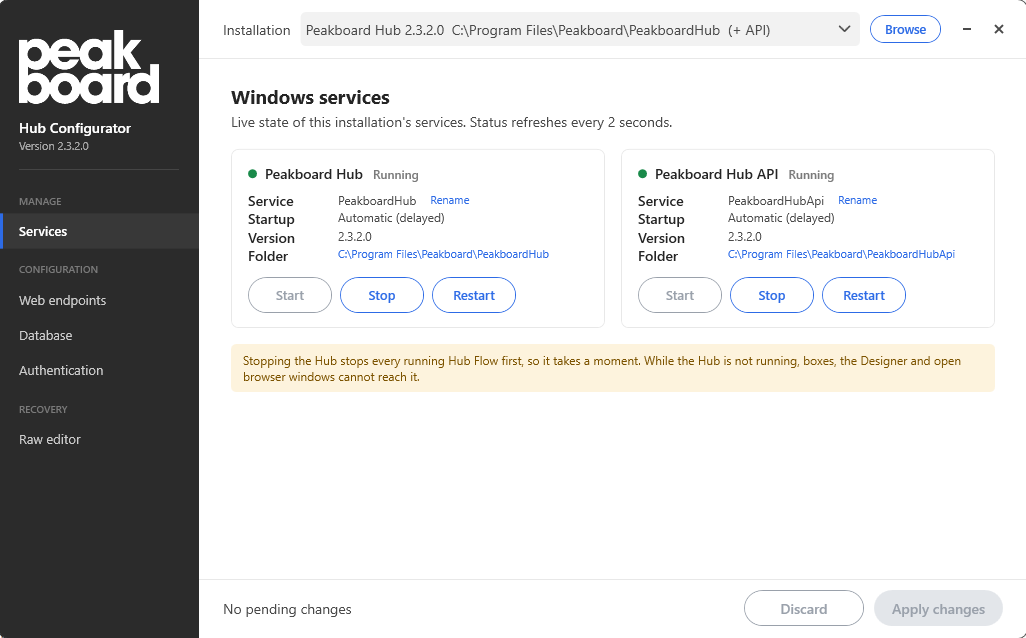
In other words, ports, certificates, the database connection and single sign-on are all changed here instead of by editing appsettings.json and juggling IIS Manager, which is exactly the kind of tool that should have existed all along.
A few things are worth knowing before we migrate a production system. Windows single sign-on is not carried over, because it was a setting on the IIS site that the migration deletes; it gets switched back on in the Configurator. Certificates have to live in the local computer’s personal store, since certificates from the IIS Central Certificate Store cannot be taken over. Ports that are shared with another IIS site stay with IIS. And the automatic backup covers the database only, so the file storage, the Hub Flows folder and appsettings.json are our own responsibility. The migration guide walks through all of it, including the rollback path, and is required reading before the maintenance window.
The setup got a general overhaul while they were at it: a clearer structure, the option to use a remote SQL Server with SQL authentication, the ability to initialize an existing empty database, automatic detection and installation of the required .NET runtime, and new default folders under C:\Program Files\Peakboard\PeakboardHub and C:\ProgramData\Peakboard\PeakboardHub.
Worth the Upgrade
Taken together, 2.3 is the most consequential Hub release in a long time. LINK changes what a Peakboard application needs in order to run, and the move away from IIS changes what a Hub server needs in order to exist. The full list of changes is in the official version history, and it is considerably longer than this article.